
catpin.com
Bubble Test Sheet Generator
Contact Me


I realize teachers usually
operate with limited funds,
but if this site is truly help-
ful to you, please consider
contributing a small dona-
tion.  Thank You.


You can view a few random
samples of actual bubble-
sheets that teachers have
made.

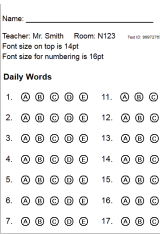
View a Random Bubblesheet Sample 1
Sample 2
Sample 3


The New Bubbletest Generator
Sorry, having many
problems with the
"new" version ...
Use it "as-is".
New Bubble Test


Scatterchart
Give feedback to students
with this useful graphing
and statistical tool.


  A Minnesota Business


I'm proud to Support:
- Teachers
- Educators
- Students
- Schools
- Businesses
- Testing Services

Print out practice
Bubble Test Sheets
for your Students.

Create a test key by
printing a sheet on
a clear transparency.
Use a permanent pen
to mark the correct
answers on test key.

Having Problems?
Having Problems?
Click Here


Special Features

View Sample Test Sheet "Math Grids" - Grades: | 3 | 4-5 | 6-8 | 9-12 |

Blank Boxes will not appear on test form ...
Remember my name and classroom on this PC.   Saved Using Cookies Saved Using Cookies

Test Title:

Teacher's name:   Saved with Cookies

Teacher's Room:   Saved with Cookies

Hour  Period   Quarter  Semester   (enter value here)

Test:   (Date, ID, Number, Etc)

Print "Student ID:___"   instead of "Name:___"

Print "Date:___"   (Students can write-in a date)   Saved with Cookies

Test Version: Enter Style Numbers 13-20 for Bubble Display

Font Size Control: (for text and numbering)
Does not change bubble size. The bubbles are graphic images, not text.

Display test headings in this language ...
 English   Español 

Formatting height of paper ...
Standard 8.5" X 11" paper only fits up to 30 questions per column.
If you want to use more, you set up your printer however you want.
Maximum Questions per column:


You can print up to four columns on the form.
Each column can have a different bubble style.

Column Caption            Question Numbers         Bubble Style (See Below)
(optional)
   Numbers to    Style
   Numbers to    Style
   Numbers to    Style
   Numbers to    Style

   We offer some special features: Special Features
You can type in the name of the sections (eg. Part 1, Section 1, etc.)
It will only print the sections where you specify amount of questions.
(you may need to adjust your printer margins (left/right,top/bottom).

Hint: If your Column Caption is lengthy and it messes up the printout,
you can do a linefeed by inserting <br> in between the words
where you want to do the linefeed.


Bubble Styles to choose from ...

1   
2   
3   
4   
5   
6   
7   
8   
9   
10  
11  
12  

alternate numbering:
25  
       
26  
       

27  
       
28  
       

29  
30  

35  
36  
37  [no bubbles/blank]

39  
       
40  
       

13  
14  
15  
16  
17  
18  
19  
20  

t-cap test numbering:
21  
       
22  
       

alternate numbering:
23  
       
24  
       

31  
       
32  
       

33  
       
34  
       

Select Misc Options ...

   Print Alternating Color Background  ( every other line ).
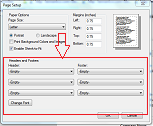
        Your browser needs to be set-up to print background colors.
        For instructions on printing background colors: printing colors
       Select Color:  1    2    3    4    5    6    7 


   Print BOLD Letters  ... Example:


   Print BLANK Bubbles  ... Example:
        Only valid for large and small round 'letter' bubbles.
        This option takes precedence over the BOLD option.
          - Select Styles 1-8 for this option.


   Include TRUE - FALSE Letters ... Example:
        Prints at the top of each column. (A=true, B=false)


   Include Instructions:
Prints at the top of the test form.


   Center the columns on printout.


   Force each column to begin with ABCD...
        For styles such as 21-34. Use this if you have an odd
        number of questions in a column and you don't want
        the letter sequence to carry-over into the next column.


   Force question no. one to begin with FGHJ...
        For example, instead of starting the test with ABCD, it will
        start out with the 2nd line, like FGHJ. This only affects
        the first question (question number one).


   Group sections of the test. (example: 5)
        This will cause a slight blank space between questions,
        making it easier for students to keep their place on
        the sheet. Select how many questions for each group.
        Grouping by 5 or 10 is most common - experiment with it.
        (Leave this blank for non-grouping of questions)


   Include Registration Marks  ( )
        Prints marks in the leftmost column to simulate
        printout for an automated test marking machine.


   Assign a unique 'Test ID' number.
        Select this option to reprint your form at a later date.
        All data is saved for future retrieval (for 1-2 months).
        The ID number will appear on your form.


    Generate your Bubble Test Form (click the image below):


I am open to suggestions, comments, and improvements to this script.
If there is anything you would like to see added or changed, please let
me know ... Thank You.     Send me a message

Teachers ... Using this Bubble Test Generator online is free!


A note from Max:

The original intent of this site is to create "sample tests" for student practice. Although it's not perfect, I'm hoping this website will help out in some small way. See the Latest Features added below!

Latest features ...

Added (Nov 6, 2008):
Some schools start their tests with FGHJ instead of ABCD. There is now a checkbox to force question number one to start with the 2nd line of bubble style. This only affects question no. 1 of any given column.

Added (Oct 24, 2008):
Now you can print a column without any question numbers. This might be useful for using styles 35, 36, or 37. Perhaps you want a few lines without question numbers attached?
Add 200 to the STYLE No. to use this feature ...
See this example

Added (Oct 24, 2008):
Now you can print as many questions as you want in any of the 4 columns. There is still a 4 column limit, but if you don't care how many sheets are printed, put in 100 questions on one column.

Added (Oct 13, 2008):
Add a test version number. Use it for when you might have three different sets of questions for the same test. Know which test version your student is taking. Enter a version number like 1,2 or 3. If you wish to have the student identify the version of their question sheet, enter a Style Number from 13-20 to display the version as fill-in bubbles.


Copyright© 2001-2009 by Catpin Productions
All Rights Reserved.    Max Seim